

Custom review components
Pass a review object to a transaction method on useSeams().wallet to show your own React component before wallet approval. When the person continues, the same modal changes from your component to wallet approval. The person sees one dialog, not a second popup. The flow is:
Your review → Continue to wallet → wallet approval → transaction result.
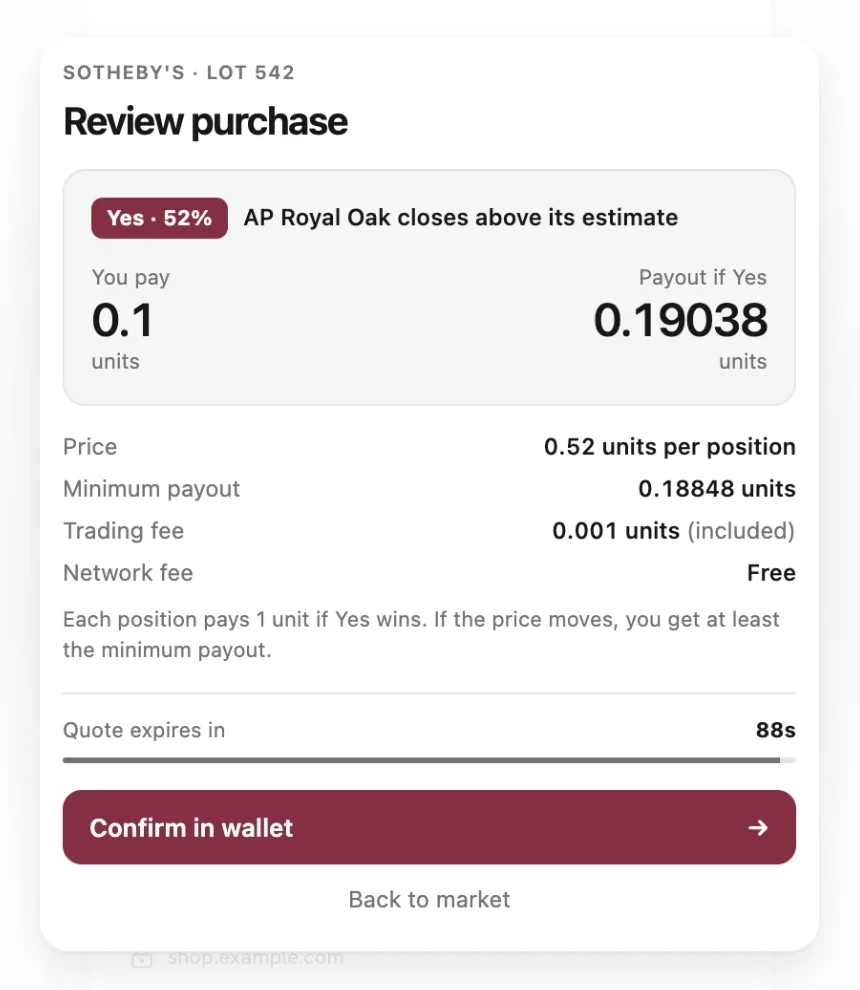
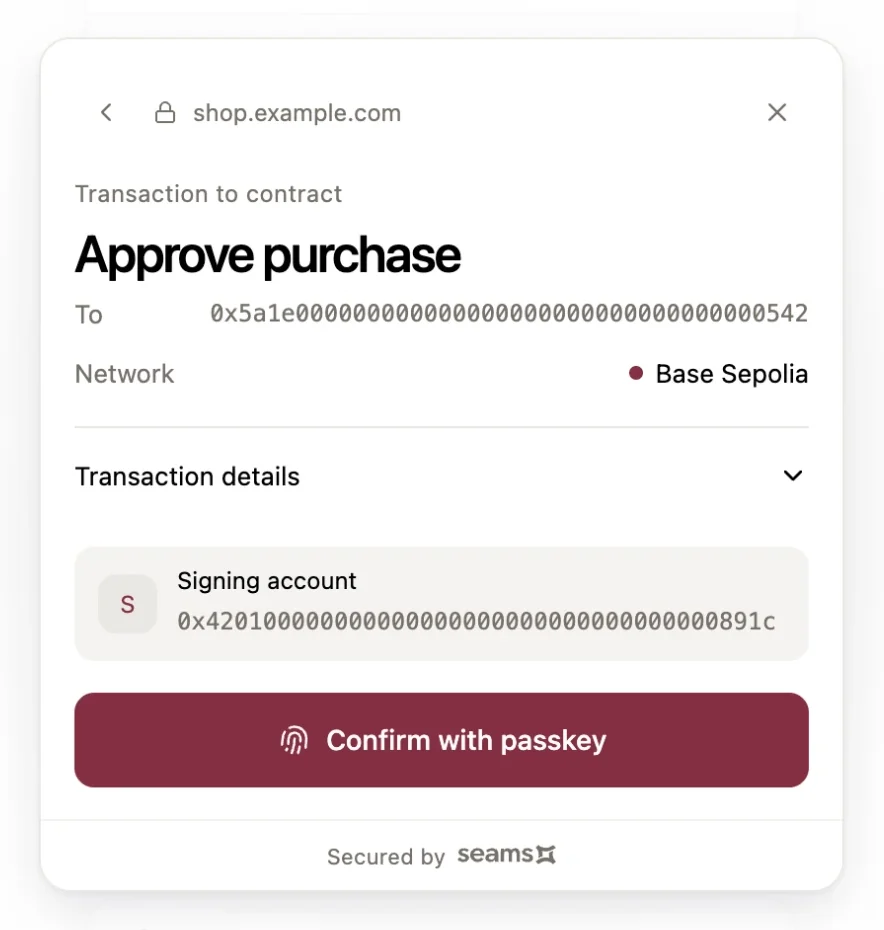
Try the flow in the Custom Components demo on wallet.seams.sh.
How the handoff works
- Your app calls a transaction method with
review. The SDK opens a modal and renders your component in it. Withorigin, the modal grows from your own element. - The person reads your terms. Your button calls
controls.continueToWallet(). - The modal resizes and crossfades to wallet approval. The wallet iframe draws this step from the captured transaction. The person confirms with a passkey.
- The back arrow in wallet approval returns to your component. Your component keeps its local state, and the quote deadline does not change.
Your component cannot sign or change the transaction. It only decides when to show wallet approval. The wallet origin shows the transaction that the person signs, so an error in application UI cannot change what the wallet signs.
Mount the host
Mount one TransactionReviewHost beneath SeamsWebProvider and every app provider your review needs. The component that submits the transaction must also descend from this host.
import { SeamsWebProvider, TransactionReviewHost } from '@seams/wallet/react';

<SeamsWebProvider config={config}>
  <TransactionReviewHost>
    <App />
  </TransactionReviewHost>
</SeamsWebProvider>
Reviews inherit context from the host's ancestry. Providers mounted only around the calling button do not supply context to the review.
Pass a React component
The render callback receives the controls and returns your component. That component can use hooks, context, local state, and React.lazy/Suspense.
review: {
  title: 'Review purchase',
  validity: { kind: 'unbounded' },
  render: (controls) => (
    <PurchaseReview quote={quote} controls={controls} />
  ),
}
Here, PurchaseReview and quote belong to your application. Return JSX from the synchronous callback. Place hooks inside the returned component.
The SDK supplies the dialog, backdrop, and focus management. Supply content and buttons without another dialog or focus trap.
| Control | Effect |
|---|---|
continueToWallet() | Shows wallet approval. The user must approve there before signing. |
cancel() | Cancels the review. |
fail(error) | Shows the SDK's dismissible error fallback. Use for event-handler or fetch failures. |
Start from your own modal
Pass origin to grow the review from your own element. Use onVisible to learn when the review or the wallet approval is on screen.
review: {
  title: 'Review deposit',
  validity: { kind: 'unbounded' },
  origin: amountCard.getBoundingClientRect(),
  onVisible: ({ stage, rect }) => {
    if (stage === 'review') closeAmountModal();
    trackSurface(stage, rect);
  },
  render: (controls) => <DepositReview controls={controls} />,
}
origin is a rectangle in viewport pixels. The SDK reads it once when you call the method. It applies only to the first review. Wallet approval never starts from application geometry. With reduced motion, the review appears in place.
onVisible receives stage and rect. stage is review when your component is visible, and wallet when wallet approval is ready. Back to review reports review again. rect is the settled position in viewport pixels. An error from this callback does not change the transaction.
The review opens above your modal. Close your modal in onVisible, so that no frame shows an empty page. If your modal held focus, the SDK cannot return focus to it after you remove it, so move focus yourself when the operation ends.
Choose validity explicitly
validity is required so each call explicitly chooses whether the reviewed transaction has a deadline.
{ kind: 'unbounded' }: no review deadline, suitable for a transfer without an expiring quote.{ kind: 'expires_at', atMs: quote.expiresAtMs }: use the quote's deadline as a positive safe-integer Unix timestamp in milliseconds.
Expiry prevents approval and additional signatures. It cannot undo a signature already started. Refresh an expired quote. Make a new call with that quote. Changing an existing quote does not update the captured transaction. Use contract deadlines and slippage limits for transaction-level economic guarantees.
Runnable NEAR example
Render this button beneath the host with a signed-in NEAR account. It sends a zero-value self-transfer. Gas fees apply. Use a testnet wallet to try it.
import { useState } from 'react';
import {
  transfer,
  useSeams,
  type BoundNearSigner,
  type TransactionReviewControls,
} from '@seams/wallet/react';

type TransferState =
  | { kind: 'ready'; message: string }
  | { kind: 'pending' }
  | { kind: 'blocked'; message: string };

function TransferReview({ controls }: { controls: TransactionReviewControls }) {
  return (
    <>
      <p>This example sends a zero-value transfer to your own NEAR account. Gas fees apply.</p>
      <button type="button" onClick={controls.continueToWallet}>
        Continue to wallet
      </button>
      <button type="button" onClick={controls.cancel}>
        Cancel
      </button>
    </>
  );
}

function renderReview(controls: TransactionReviewControls) {
  return <TransferReview controls={controls} />;
}

async function submitTransfer(signer: BoundNearSigner, setState: (state: TransferState) => void) {
  setState({ kind: 'pending' });
  try {
    const result = await signer.signAndSendTransaction({
      receiverId: signer.accountId,
      actions: [transfer('0 NEAR')],
      options: {
        confirmationConfig: { uiMode: 'modal', behavior: 'requireClick' },
      },
      review: {
        title: 'Review transfer',
        validity: { kind: 'unbounded' },
        render: renderReview,
      },
    });
    if (result.success) {
      setState({ kind: 'ready', message: `Transfer submitted: ${result.transactionId}` });
      return;
    }
    switch (result.kind) {
      case 'not_submitted':
        setState({ kind: 'ready', message: `${result.error} You can review a new attempt.` });
        return;
      case 'unresolved':
        setState({
          kind: 'blocked',
          message: `Check transaction ${result.transactionId} before another send.`,
        });
        return;
      case 'submission_unknown':
        setState({ kind: 'blocked', message: 'Check wallet activity before another send.' });
        return;
      default:
        return assertNeverTransferResult(result);
    }
  } catch (error) {
    const message = error instanceof Error ? error.message : 'The wallet response was interrupted.';
    setState({
      kind: 'blocked',
      message: `${message} Check wallet activity before another send.`,
    });
  }
}

function assertNeverTransferResult(value: never): never {
  throw new Error(`Unsupported transfer state: ${String(value)}`);
}

export function ReviewedTransferButton() {
  const { wallet } = useSeams();
  const [state, setState] = useState<TransferState>({ kind: 'ready', message: '' });
  if (wallet?.access !== 'wallet' || !wallet.near) return <p>Sign in with a NEAR account to try this example.</p>;

  return (
    <>
      <button
        type="button"
        disabled={state.kind !== 'ready'}
        onClick={submitTransfer.bind(null, wallet.near, setState)}
      >
        Review transfer
      </button>
      <p role="status">
        {state.kind === 'pending' ? 'Waiting for review and wallet approval…' : state.message}
      </p>
    </>
  );
}
Purchase example with an expiring quote
This EVM example follows the demo in the pictures. Your backend returns a quote with a deadline and the call to your market contract. The component shows a countdown and disables Confirm in wallet when the quote expires. validity uses the same deadline, so the SDK also stops wallet approval after expiry. The review grows from the Buy Yes button.
import { useEffect, useState, type MouseEvent } from 'react';
import {
  TransactionReviewError,
  useSeams,
  type BoundEvmSigner,
  type TransactionReviewControls,
  type TransactionReviewRect,
} from '@seams/wallet/react';

// Your backend prices the trade and builds the call to your market contract.
// `expiresAtMs` is the quote deadline as a Unix timestamp in milliseconds.
export type PurchaseQuote = {
  claim: string;
  pay: string;
  payout: string;
  minimumPayout: string;
  fee: string;
  expiresAtMs: number;
  tx: {
    to: `0x${string}`;
    data: `0x${string}`;
    value: bigint;
    gasLimit: bigint;
    maxFeePerGas: bigint;
    maxPriorityFeePerGas: bigint;
  };
};

type PurchaseState =
  | { kind: 'ready'; message: string }
  | { kind: 'pending' }
  | { kind: 'blocked'; message: string };

function secondsUntil(deadlineMs: number): number {
  return Math.max(0, Math.ceil((deadlineMs - Date.now()) / 1000));
}

function startCountdown(deadlineMs: number, setSeconds: (seconds: number) => void) {
  const tick = () => setSeconds(secondsUntil(deadlineMs));
  const timer = window.setInterval(tick, 1000);
  return () => window.clearInterval(timer);
}

// The SDK draws the dialog, the `review.title` heading, and the backdrop.
// This component supplies only the content and the two buttons.
function PurchaseReview({
  quote,
  controls,
}: {
  quote: PurchaseQuote;
  controls: TransactionReviewControls;
}) {
  const [seconds, setSeconds] = useState(secondsUntil(quote.expiresAtMs));
  useEffect(() => startCountdown(quote.expiresAtMs, setSeconds), [quote.expiresAtMs]);
  return (
    <>
      <p>{quote.claim}</p>
      <dl>
        <dt>You pay</dt>
        <dd>{quote.pay}</dd>
        <dt>Payout if Yes</dt>
        <dd>{quote.payout}</dd>
        <dt>Minimum payout</dt>
        <dd>{quote.minimumPayout}</dd>
        <dt>Trading fee</dt>
        <dd>{quote.fee} (included)</dd>
      </dl>
      <p>{seconds === 0 ? 'Quote expired' : `Quote expires in ${seconds}s`}</p>
      <button type="button" disabled={seconds === 0} onClick={controls.continueToWallet}>
        Confirm in wallet
      </button>
      <button type="button" onClick={controls.cancel}>
        Back to market
      </button>
    </>
  );
}

function reviewMessage(error: TransactionReviewError): string {
  switch (error.code) {
    case 'cancelled':
      return '';
    case 'review_expired':
      return 'The quote expired. Get a new quote to buy.';
    default:
      return `${error.message} You can review a new attempt.`;
  }
}

async function buy(
  signer: BoundEvmSigner,
  quote: PurchaseQuote,
  origin: TransactionReviewRect,
  setState: (state: PurchaseState) => void,
) {
  setState({ kind: 'pending' });
  try {
    const { txHash } = await signer.signAndSendTransaction({
      chainTarget: 'ethereum-sepolia',
      request: {
        chain: 'evm',
        kind: 'eip1559',
        senderSignatureAlgorithm: 'secp256k1',
        tx: quote.tx,
      },
      options: {
        confirmationConfig: { uiMode: 'modal', behavior: 'requireClick' },
      },
      review: {
        title: 'Review purchase',
        validity: { kind: 'expires_at', atMs: quote.expiresAtMs },
        origin,
        render: (controls) => <PurchaseReview quote={quote} controls={controls} />,
      },
    });
    setState({ kind: 'ready', message: `Purchase submitted: ${txHash}` });
  } catch (error) {
    // A review error means that nothing was signed or sent.
    if (error instanceof TransactionReviewError) {
      setState({ kind: 'ready', message: reviewMessage(error) });
      return;
    }
    const message = error instanceof Error ? error.message : 'The wallet response was interrupted.';
    setState({ kind: 'blocked', message: `${message} Check wallet activity before another buy.` });
  }
}

export function BuyButton({ quote }: { quote: PurchaseQuote }) {
  const { wallet } = useSeams();
  const [state, setState] = useState<PurchaseState>({ kind: 'ready', message: '' });
  if (wallet?.access !== 'wallet') return <p>Sign in to buy.</p>;

  // The review grows from this button. The SDK reads the rectangle once, at the call.
  const onClick = (event: MouseEvent<HTMLButtonElement>) =>
    void buy(wallet.evm, quote, event.currentTarget.getBoundingClientRect(), setState);

  return (
    <>
      <button type="button" disabled={state.kind !== 'ready'} onClick={onClick}>
        Buy Yes
      </button>
      <p role="status">
        {state.kind === 'pending' ? 'Waiting for review and wallet approval…' : state.message}
      </p>
    </>
  );
}
Set chainTarget to an EVM network in your provider config. A review_expired error means that nothing was signed. Get a new quote and make a new call.
Supported methods and settings
Signer on useSeams().wallet | Methods accepting review |
|---|---|
near | signAndSendTransaction |
evm | signTransaction, signAndSendTransaction |
tempo | signTransaction, signAndSendTransaction |
A readable wallet (access: 'external') accepts review on near.prepareOwnerTransaction. The review opens at operation.approve(), and the outcome is typed. See owner approval with an application session. That call always uses the modal with an explicit click, and it takes no confirmation settings.
Custom reviews require a hosted wallet iframe and effective confirmation settings of uiMode: 'modal' and behavior: 'requireClick'. Set them explicitly as in the example to override incompatible saved preferences. Automatic approval delays are unsupported. Core SDK calls, message signing, export, and authentication do not accept this React review API.
The SDK captures transaction inputs and confirmation settings when called. The returned promise and lifecycle callbacks retain the method's existing meaning. Continue alone does not resolve the transaction. Calls queue with other wallet transactions. Cancelling or unmounting the caller or host invalidates queued and pre-signing work. After signing starts, the call preserves the wallet's actual result.
Errors and styling
NEAR returns the transaction outcome for review cancellation, pre-submission failure, and uncertain submission. Clear pending state and offer another review only for not_submitted. Retain a hash from unresolved until its chain outcome is known. Before dispatch, review failures invoke no signing callbacks.
EVM and Tempo review failures before dispatch reject with TransactionReviewError. Their signing and transport failures retain the canonical methods' error contracts.
TransactionReviewError.code | Meaning |
|---|---|
cancelled | The review was cancelled. |
review_expired | The deadline passed. Obtain a fresh quote before retrying. |
review_invalid_input | The review configuration or transaction input is invalid. |
review_host_unavailable | A usable review host is missing. |
review_owner_disposed | The caller or host was disposed. |
review_unsupported_mode | The runtime or confirmation mode does not support review. |
review_identity_changed | The wallet identity changed during the flow. |
review_render_failed | Rendering failed or the app called fail(error). |
review_prepare_timeout | Review loading or wallet preparation timed out. |
The optional review.className styles the review wrapper. App CSS is available, but the portal changes DOM ancestry: ancestor selectors, inherited CSS variables, and CSS-in-JS insertion targets may need adjustment. SDK light/dark and shape tokens remain available. Your content must satisfy your application's CSP.
Wallet approval includes Back to review when opened from an application review. Back preserves the review component's local state and the original quote deadline. Continue resumes the same pending approval without dispatching another transaction. The shared modal resizes and crossfades in both directions. Back is available until wallet approval is submitted. Changing transaction inputs requires a new call.